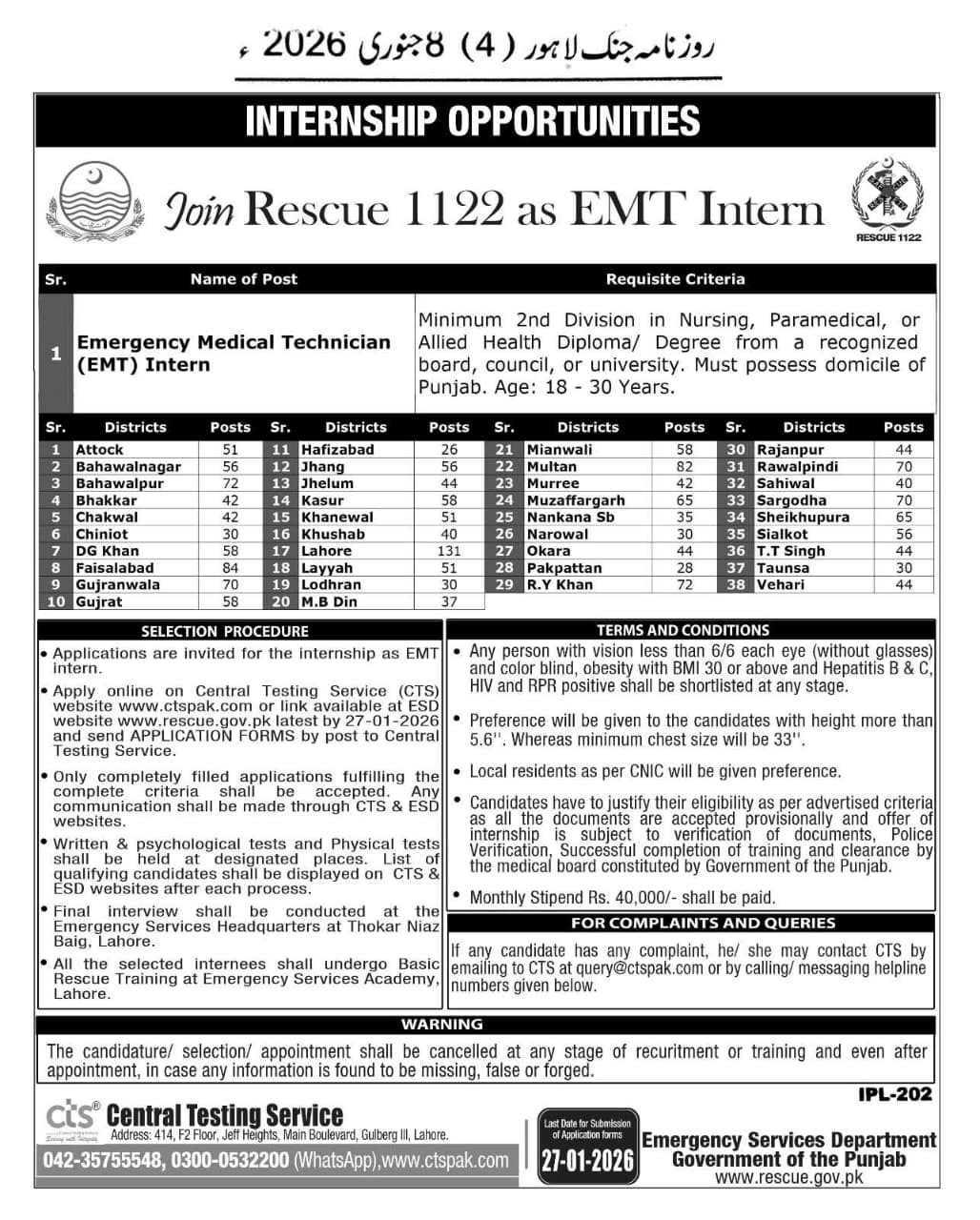
How to Fill the Online Application Form?
• Visit Central Testing Services website www.ctspak.com / www.ctsp.org.pk
• Click on the Central Testing Services Rescue 1122 Jobs Link
https://ctspak.com/rescue-1122-2602/
• Click on Register Yourself and give information details Name / Email / Mobile Number / CNIC /
Password / Confirm Password.
• After Register Yourself Login to your account and Fill Online Application form as required.
• Give all required details Personal Information / Contact Information / Academic Information /
Experience Details Correctly.
• Candidate needs to mention/ apply for relevant provincial Quota before submitting Online
Application.
• In academic record portion, write down your major subjects and percentage of secured marks in two
digits only. In academic record column "Board / University" (please write only particular board name in
abbreviation (e.g., BISE Rawalpindi, BISE Gujranwala, BISE Lahore etc.
• Uploading of Candidates recent Passport Size Photo is Mandatory.
• Go to Jobs Dashboard and Apply for Suitable Job.
• Download the Fee Challan / Paid the Prescribed Fee in Bank.
• Submit the Online Application and Print the Downloaded Application after submission.
• If Candidates need to apply for multiple posts, need to apply separately with separate Bank Paid
deposit slips.
• Attach all academic and experience certificates along with Online Filled, Submitted,
Downloaded Application form and send it to Central Testing Services Office 414, F2, Jeff
Heights, Main Boulevard, Gulberg III Lahore Pakistan before 27th January, 2026.
• Incomplete or improperly filled registration details will not be processed.
• Please stay interactive with our website for eligible candidates list, test venue and all related
information: www.ctspak.com / www.ctsp.org.pk .
• For any type of queries please send email to Query@ctspak.com
• For Helpline Call WhatsApp Number: 03000-532200 or Call 042-5755548 (Morning 09:00 AM to
Evening 5:00 PM)